Ecommerce Homepage Design: Above the Fold in 2026
A practical guide to planning the first screen of your store around what shoppers need to see and do.
On this page
- What does “above the fold” mean for an ecommerce homepage?
- Before you redesign: gather the right evidence
- Step 4: Choose the layout for your business model
- Step 5: Write the first-screen message and choose the action
- Step 6: Design the visual hierarchy, not just the hero image
- Step 7: Design mobile as its own layout
- Step 8: Protect speed and layout stability
- Step 9: Build a focused test plan
- Mistakes to avoid when designing the first screen
- Pre-launch checklist
- A better first screen starts with a better decision
Ecommerce homepage design works best when the first screen helps a shopper understand what you sell and choose a useful next step. Put your brand, a clear value proposition, relevant navigation and one strong action above the fold, then tailor the layout to whether you sell one hero product, a wide catalogue or a subscription.
There is no universal homepage template that fits every store. This guide walks you through the decisions in order, from gathering evidence to choosing a layout and checking the mobile experience. If you are planning a broader store redesign, see how DesignFIT approaches ecommerce website projects and its website design service.
What does “above the fold” mean for an ecommerce homepage?
Above the fold is the part of a page visible before a visitor scrolls. On a phone, that view changes with the device, browser controls, text size and orientation. On desktop, it changes with the screen size and the height of the browser window. It is not a fixed pixel measurement you can design once and forget.
The fold still matters, but it is not a demand to cram the whole store into one screen. Nielsen Norman Group’s research found that people spend a larger share of their viewing time above the fold, while also finding that they do scroll. The practical lesson is to make the first screen clear and give people a good reason to continue, not to hide every important detail above it. See Nielsen Norman Group’s findings on scrolling and attention.
For a store, a useful first view usually answers four questions:
- What kind of store is this?
- Is there a product or category relevant to me?
- Why should I trust this brand?
- What can I do next?
The first view does not need to answer every question about shipping, materials, sizing or returns. It should make those details easy to find when they matter. The goal is a clear route into the catalogue or offer, not a miniature version of every page on your site.
Before you redesign: gather the right evidence
A homepage redesign is not just a fresh hero image and a different font. First find out what shoppers come to do, where they enter the site, and where the current page makes their next step harder than it needs to be.
Step 1: Identify the main commercial job of the homepage
Write one sentence that describes the homepage’s primary job. For example: “Help first-time shoppers understand our cookware range and find the right pan,” or “Help returning customers reorder coffee while introducing new visitors to a starter subscription.”
That job should come from the business model and customer behaviour, not from an internal preference such as “we want the new campaign to be the first thing people see.” A homepage may need to support more than one audience, but it still needs a clear hierarchy. Decide which audience and action get the most prominent place, then give secondary routes enough visibility to remain findable.
Look at analytics and customer feedback before you settle on that hierarchy. Useful questions include:
- Which landing pages bring visitors into the site, and how many arrive directly on the homepage?
- What searches do visitors use on the site?
- Which homepage links get used, and which are ignored?
- Which products and categories contribute most to sales or margin?
- What questions appear in customer service conversations, reviews and returns?
- Do new and returning customers behave differently?
Use the tools you already have, such as analytics, ecommerce reports, customer surveys and support transcripts. If you have enough traffic, compare behaviour by device and by new versus returning visitors. Avoid treating one short-term sales spike as proof of a lasting pattern. Campaigns, seasonality and stock availability can all change what people click.
Step 2: Map the catalogue and the visitor’s choices
Make a simple list of your main product groups, best-selling products, new arrivals, promotions and any products that need extra explanation. Mark which options are most important to a first-time shopper and which serve a returning customer who already knows what they want.
Then sketch the most common routes from homepage to product. For a catalogue store, a route might be “homepage, women’s running, shorts, product.” For a subscription store, it might be “homepage, compare plans, choose delivery frequency, subscribe.” If the route is hard to describe, the navigation or product structure may need work before the visual design.
Baymard’s homepage and category usability research is a useful reference for reviewing how shoppers discover products and move through categories. Use research like this to make a checklist of potential usability issues, not to copy another retailer’s homepage wholesale. Your catalogue, audience and brand promise should determine the actual design.
Step 3: Set a baseline before changing anything
Record the current homepage’s performance so you can compare the redesign with a fair starting point. Choose measures that match the homepage’s job. Depending on the business, these might include clicks into key categories, internal search use, product views from homepage sessions, add-to-cart rate, revenue per visitor or subscription starts.
Also note the experience measures that can explain a result. Check mobile and desktop separately. Record how quickly the main content appears, whether the header or hero shifts while loading, and whether visitors reach the first product or category section. A homepage could receive more clicks on a promotion but still perform worse if shoppers cannot find the rest of the range.
Do not assume a homepage change caused a sales change just because both happened at the same time. Promotions, advertising, stock, pricing and seasonality influence ecommerce results. If you can, compare the redesigned experience with a controlled test. If not, compare similar periods and annotate other changes so the result is interpreted carefully.
Step 4: Choose the layout for your business model
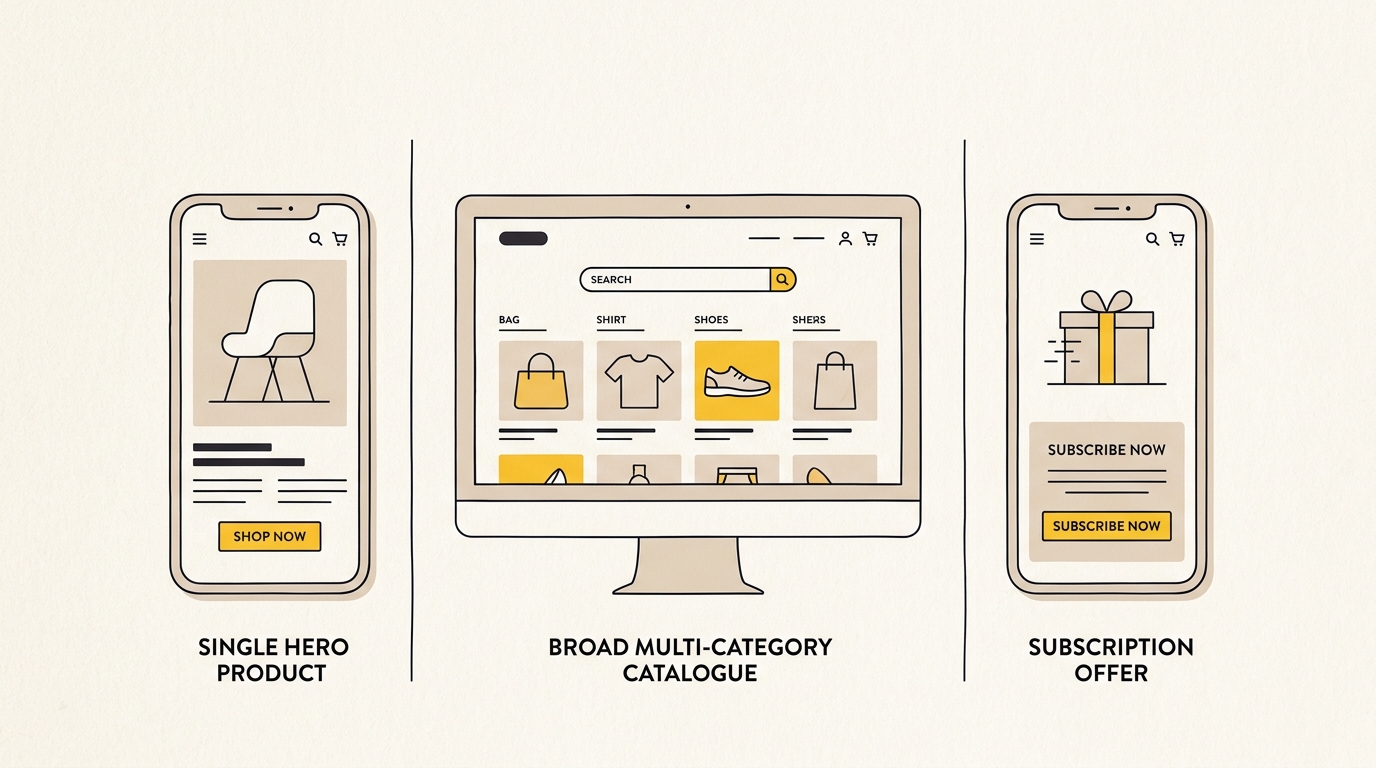
The right first-screen layout depends on the choice a shopper needs to make. A single hero product needs explanation and proof. A wide catalogue needs routes into different product groups. A subscription needs to reduce uncertainty about recurring payment and commitment.
Layout A: A single hero product
This layout suits a store where one flagship product is the main entry point, or where a small range is built around one recognisable product. The shopper may not know what the product does, why it is different or whether an unfamiliar brand is reliable. The first screen should answer the most important of those questions without turning into a long sales page.
A practical desktop composition is a two-column hero. Use one side for a concise headline, a short explanation, a primary action and a relevant trust cue. Use the other for a product image that shows the item clearly and, if useful, how it is used. The balance does not need to be exactly half and half. Give the content enough width to read comfortably and the product enough space to be recognised at a glance.
A useful order is:
- A short headline that describes the customer outcome or the product’s defining purpose.
- One sentence that explains how the product delivers that outcome.
- A primary button that names the next step, such as “Shop the starter kit” or “Choose your size.”
- A trust cue that is accurate and relevant, such as a verified review rating, a clear returns promise or a recognised certification.
- A clean image that makes the product and its context easy to understand.
Avoid generic claims such as “the best product for everyone” unless you can substantiate them. A precise benefit helps the shopper decide whether to continue. If the product needs more education, link to a clear explanation lower on the homepage or to a product page. Do not force every feature into the hero.
On mobile, stack the content and image in an order that preserves the decision. The headline, product context and primary action should not be pushed below a very tall image. Check the first view on an actual phone as well as a browser preview. A desktop crop that looks beautiful can make the product disappear on a narrow screen.
Layout B: A wide catalogue
This layout suits department stores and brands with several distinct categories. Visitors may arrive wanting different things, such as men’s clothing, homewares, sale products or a particular activity range. A hero that promotes one narrow category can make the rest of the catalogue feel invisible.
Give people obvious routes into the range. That may mean a compact navigation with clear category labels, a search field that is easy to find, or a split hero with two or three meaningful choices. The choice of format depends on the number of important routes and how customers describe them. Do not create a row of tiny category buttons just to show that the catalogue is large.
A strong catalogue homepage often uses this order:
- A header with a legible logo, useful category navigation, search and cart access.
- A campaign or brand message that does not overpower the category routes.
- Visible links to the most important product groups, using names shoppers understand.
- A glimpse of a relevant collection or product row so the visitor can see that shopping starts below.
If your categories suit visual discovery, use image cards with labels that remain readable over the photography. Add a dark or light overlay where needed, and test contrast on the actual image. If shoppers usually know what they want, a prominent search field and clear text links may be more useful than large lifestyle cards.
Make sure a promotional campaign does not accidentally imply that the store only sells the featured item. A campaign can lead the page while the header and category links keep the wider range visible. Baymard’s ecommerce homepage usability material offers useful examples of homepage and category discovery issues to check against your own site.
Layout C: Subscription and replenishment
This layout suits products that arrive on a recurring schedule, such as replenishable goods, memberships or subscription boxes. The shopper is not only deciding whether they want the product. They are also deciding whether they understand the payment, delivery cadence and level of commitment.
Show the offer plainly. Put the product or customer outcome in the headline, then explain the subscription in ordinary language. If the plan can be paused, skipped or cancelled, state the policy accurately and make the relevant details easy to reach. Avoid burying recurring billing information in small print or relying on a vague phrase such as “flexible plans.”
A useful above-the-fold order is:
- A headline describing the product or routine.
- A concise explanation of what arrives and how often.
- A clearly labelled action, such as “Choose your plan” or “Build your box.”
- A link for visitors who need help choosing, such as a product comparison or quiz, if you offer one.
- A trust or reassurance cue that addresses a real concern, such as a clear cancellation policy or delivery information.
Do not put a fake urgency message or a hard-to-verify health claim in the hero just to drive clicks. Any offer, guarantee, review figure or product claim should be accurate, current and easy to substantiate. If you have one-time purchase and subscription options, make the difference between them clear before the shopper commits.
How to choose between the three layouts
| Store model | Shopper’s first question | Best first-screen priority | Common mistake |
|---|---|---|---|
| Single hero product | “What does it do, and why this one?” | Product explanation, image, proof and a direct product action | Using a vague lifestyle headline that hides the product benefit |
| Wide catalogue | “Where do I find the category I want?” | Navigation, search and clear category routes | Letting one campaign make the rest of the range hard to see |
| Subscription | “What will I receive, and what am I committing to?” | Offer, cadence, terms and a low-friction path to choose | Hiding recurring billing or cancellation information |
Some stores combine models. A brand might sell one flagship product alongside accessories, or offer both one-time purchases and subscriptions. In that case, choose the main route using customer demand and business priorities, then make the secondary route easy to find. Do not place two competing primary buttons side by side unless they genuinely represent equally important decisions.
Step 5: Write the first-screen message and choose the action
Draft the words before you polish the layout. Start with a simple message hierarchy: headline, supporting sentence, primary action and reassurance. This prevents the design from being built around a slogan that sounds attractive but does not help a shopper understand the offer.
A useful headline is specific enough to identify the product or benefit. It should not try to carry every feature, promotion and brand value. Keep the supporting sentence focused on the next useful detail. If you need a paragraph to explain what the store sells, the category or product naming may need to be more direct.
Give the main action a label that describes what happens next. “Shop now” can work when the product or destination is obvious, but a more specific label may reduce uncertainty. For example, “Shop the travel range” tells a visitor more than “Explore.” Keep secondary actions visually quieter, and use them for a genuinely different route, such as learning how a product works.
Then decide which trust cue is most relevant. A star rating matters when shoppers are comparing products. Delivery and returns information may matter when fulfilment uncertainty is the main concern. A certification should only appear if it applies to the product and can be verified. One credible signal is more useful than a crowded strip of logos that visitors cannot interpret.
Step 6: Design the visual hierarchy, not just the hero image
A shopper should be able to scan the first screen and understand what to look at first, second and third. Use size, position, contrast, spacing and typography to establish that order. If the headline, menu, promotional strip, hero image and button all compete for attention, the page has no clear hierarchy.
Keep the logo and navigation easy to identify without making the header unnecessarily tall. A large announcement bar plus a tall header can push the actual offer out of view on a phone. If a promotion is important, keep its message brief and avoid adding another permanent strip for every shipping or discount message.
Choose imagery for the job it needs to do. A product cut-out helps people recognise an item; a lifestyle image can show context; a detail image can explain a feature. Avoid using a beautiful image that gives no clue what is being sold. If the image contains important products, link the relevant visual to the right destination or provide a clear labelled link nearby.
Use typography that is easy to read at real sizes. Check the heading on a narrow phone, not only on a large design canvas. Give buttons enough visual weight to be noticed, but do not make every link look like a primary action. The colours and type should feel consistent with the rest of the brand, product pages and campaign materials. If the homepage looks like a different company from the checkout, that inconsistency can weaken trust.
Step 7: Design mobile as its own layout
Do not treat mobile as a smaller desktop screen. A multi-column desktop hero usually needs a deliberate mobile order. Decide whether the visitor should see the headline, product image, category links or action first, then check that order on common screen sizes.
On mobile, consider whether a search field should be visible in the header or represented by a clear search control. Baymard’s research on mobile ecommerce search and navigation shows how critical clear access to core categories and search is on smaller viewports. Make important category links easy to tap. If you use a horizontal scrolling row, make it apparent that more options exist and ensure it does not trap visitors or hide the primary category. Keep the cart and account routes recognisable without turning the header into a wall of icons.
Check the page with browser controls present. A design preview often shows more vertical space than a real phone gives the page. Test portrait and landscape if your audience is likely to use both. Also check the page with larger text settings where possible. A headline that wraps to an unexpected third line can push the product action out of view.
Carousels are often used to squeeze several campaigns into one hero. Resist that instinct unless there is a strong reason. A rotating banner divides attention and can move content while someone is trying to read or tap. Baymard’s homepage carousel guidance explains the usability issues to assess. If you keep a carousel, make the controls clear, avoid rapid auto-rotation, support keyboard and touch use, and ensure every slide has a useful destination. A single strong campaign with visible category routes is often easier to understand.
Step 8: Protect speed and layout stability
The hero is often the largest visual element on the first screen, so its file size and loading behaviour matter. Use an image that fits the display rather than serving a very large desktop asset to every phone. Export a suitable modern image format where supported, provide responsive image sizes and crop intentionally for mobile and desktop.
Google’s web.dev guidance defines a good Largest Contentful Paint (LCP) experience as 2.5 seconds or less for the relevant assessment. LCP measures when the largest visible content element has rendered, often the hero image or heading. Read the Google web.dev LCP guidance before changing loading behaviour, and use the Fetch Priority API guidance to understand when prioritising an important image can help.
In practical terms, ask your developer to check that:
- The main hero image is not mistakenly lazy-loaded when it is visible immediately.
- The browser can discover and request the important image early.
- The image has responsive versions and an appropriate mobile crop.
- Its dimensions or aspect ratio are reserved so the page does not jump when it loads.
- Fonts and scripts do not delay the main message or cause visible layout shifts.
- Any promotional bar is present in the initial layout rather than being injected later and pushing content down.
Do not assume a format change or a high-priority attribute will fix every performance issue. The server, theme, third-party scripts, image dimensions, font loading and page structure all contribute. Test the live page on mobile and review field performance where available. A beautiful mock-up is not evidence that the production page loads quickly.
Step 9: Build a focused test plan
Before launch, write down what you changed and what result you expect. For example: “Making category links visible in the first view should increase visits to the main product groups without reducing product detail engagement.” This gives the team a specific question to answer rather than a vague goal to “improve conversion.”
Test one meaningful design question at a time where practical. Possible tests include:
- A product-led hero versus a category-led hero for a wide catalogue.
- A direct purchase action versus a guided product-finder route.
- A headline focused on the product outcome versus one focused on a feature.
- Search visible in the header versus a search icon that opens a panel.
- A static campaign visual versus a carousel.
Choose the primary measure before you start, then watch for unintended effects. A new hero may increase clicks into one collection but make search harder to find. A subscription CTA may attract more clicks without increasing completed subscriptions if the plan details remain confusing. Review the full journey to the outcome, not only button interactions.
If traffic is limited, avoid declaring a winner from a handful of sessions. Use customer interviews, moderated usability checks, support questions and observed shopping sessions to find obvious friction. These methods will not replace a controlled experiment, but they can reveal confusing labels or missing information before you invest in a larger test.
Mistakes to avoid when designing the first screen
- Treating one screen size as the fold. The visible area changes across devices and browser interfaces. Design responsively and test actual phones.
- Making the hero image the whole message. A beautiful image cannot explain the product, category or next step by itself.
- Putting several primary actions at equal weight. Too many competing buttons make visitors work out which route matters.
- Hiding the catalogue behind a campaign. Keep important categories or search visible when shoppers arrive with varied intent.
- Using a carousel to avoid choosing a message. Decide which offer or route deserves priority instead of rotating several messages past the visitor.
- Adding too much copy above the fold. Put the essential proposition and action first. Move detailed education to a page or section where it can be read properly.
- Using unsupported proof. Check review figures, awards, guarantees and product claims before publication.
- Ignoring loading behaviour. A large, late-loading hero can undermine the experience before visitors have seen the design.
- Redesigning without a baseline. Without a clear before-and-after measure, it is difficult to learn what the design changed.
Pre-launch checklist
Use this checklist on desktop and mobile before the homepage goes live:
- Can a first-time visitor tell what the store sells from the first view?
- Is the most useful next action obvious and accurately labelled?
- Can shoppers reach important categories or search without hunting?
- Does the layout fit the store model: hero product, wide catalogue or subscription?
- Is the product or category visible in the image and linked where appropriate?
- Are delivery, returns, subscription terms and trust cues clear where they affect the decision?
- Does the mobile layout show the right content in the right order?
- Do buttons, text and image overlays remain readable and usable?
- Does the first screen load without an avoidable delay or visible jump?
- Have you recorded a baseline and chosen what success means?
A better first screen starts with a better decision
The best ecommerce homepage design is not the one with the biggest hero or the most campaign content. It is the one that helps the right shopper understand the offer and move confidently to a relevant product, category or plan. Start with customer behaviour, choose a layout that fits your business model, then make the message, image, navigation and action work together.
If you are ready to plan a store redesign, explore DesignFIT’s ecommerce design work or learn more about its website design service. You can also view our transparent design pricing to plan your budget.
Key takeaway
Design the first screen around the shopper’s next decision, then make every visual element help them take it.
Questions people ask
What should be above the fold on an ecommerce homepage?
Show your brand, a clear indication of what you sell, the most useful navigation or category routes, and one primary action. Add a relevant trust cue or reassurance when it helps shoppers decide, but leave detailed explanations for the sections or pages where they belong.
How many pixels is above the fold on mobile?
There is no fixed height that applies to every phone. The visible area changes with device dimensions, browser controls, orientation and text settings, so check the design on real devices rather than relying on a single pixel target.
Are homepage carousels effective for ecommerce?
A carousel can show multiple campaigns, but it also divides attention and may move content while shoppers are reading or tapping. Start with one strong message and clear shopping routes; use a carousel only when each slide has a distinct purpose and accessible controls.
Should I use a video background in my ecommerce hero?
Usually, a static image is the safer starting point because it can explain the product without adding the loading demands of a background video. If video is important to understanding the product, test its performance on mobile and provide a clear still image fallback.


