Elementor vs Gutenberg vs Custom Theme: How to Choose
The right WordPress build gives your team room to publish without letting every page become a new design.
On this page
- What are you comparing, and why?
- Elementor vs Gutenberg vs custom theme: at a glance
- 1. Design control: freedom or guardrails?
- 2. Editing experience: who will use the site after launch?
- 3. Speed and Core Web Vitals: what can the build affect?
- 4. Cost over time: compare more than the first invoice
- 5. Flexibility, lock-in and what happens if you change your mind?
- Pros and cons by approach
- Verdict by situation: which should you choose?
- Questions to settle before you commission the build
- The bottom line
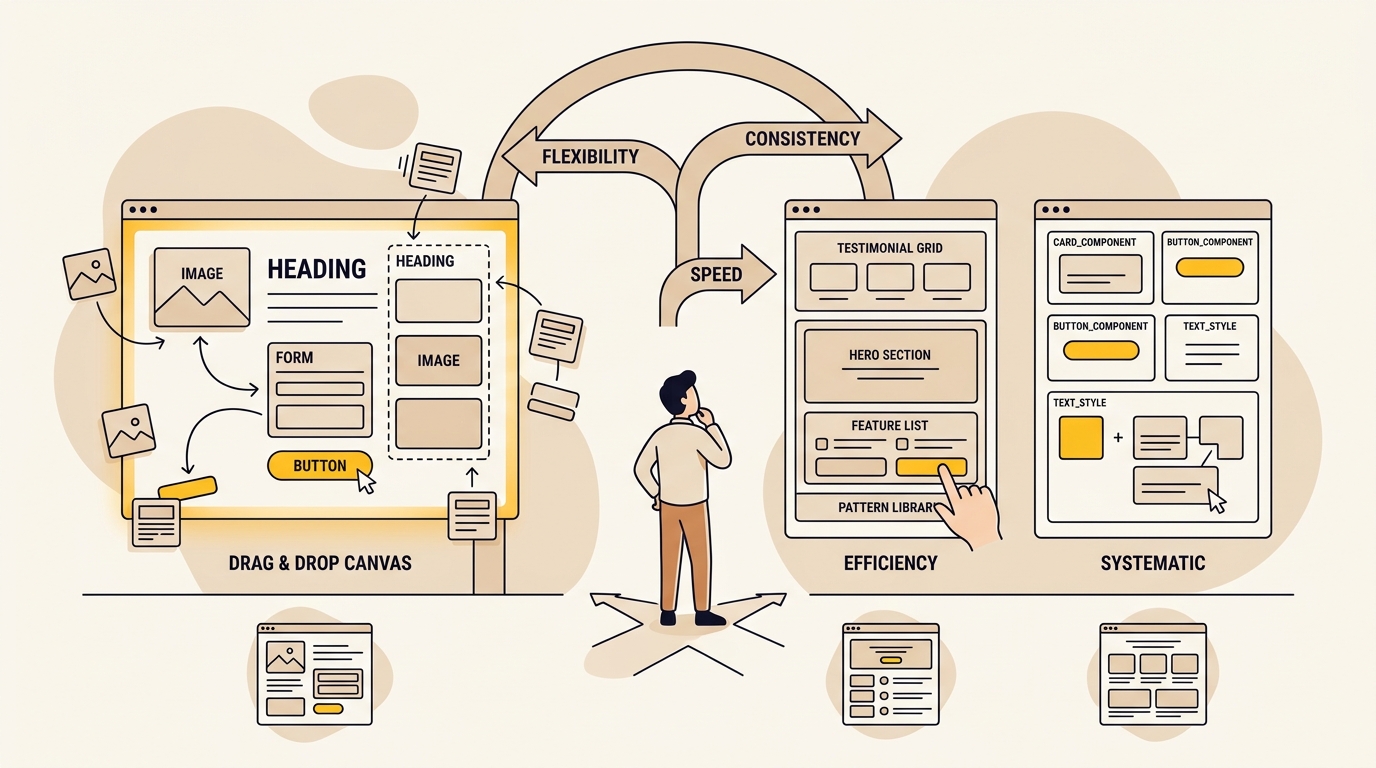
The best choice in the elementor vs gutenberg vs custom theme decision depends on how much design freedom your team needs and how much consistency you want to protect. Elementor offers the most direct visual control, Gutenberg gives editors a native block system with more scope for guardrails, and a custom theme can make approved layouts the easiest option to use. The right build should make publishing easier while keeping the site clear, consistent and useful to customers.
This is a design decision as much as a technical one. Layout, type, spacing, imagery and mobile behaviour all influence how quickly visitors understand your offer and find the next step. If you are planning a rebuild, DesignFIT’s WordPress website design service can help shape the page system and editing experience together, rather than treating them as separate problems.
What are you comparing, and why?
Elementor, Gutenberg and custom themes are three ways to make and manage pages in WordPress. They are not exact equivalents. Elementor is a visual page-building plugin, Gutenberg is the WordPress block editor, and a custom theme is a tailored codebase that can use Gutenberg blocks, custom fields or both.
The practical question is not just, “Which one is fastest?” It is: “How should our team make pages, and what boundaries will keep the site easy to edit, quick to use and on brand?” A page editor affects the choices a staff member can make after launch. That affects the visual consistency of service pages, campaign pages and articles, not just the developer’s experience during the build.
This comparison focuses on five things that matter to a business team:
- Design control: Can editors make useful changes without creating inconsistent pages?
- Editing experience: Is publishing straightforward for the people who will actually use WordPress?
- Performance potential: How much unnecessary markup, styling and scripting does the build introduce?
- Cost over time: What are you paying for the build, licences, maintenance and future changes?
- Flexibility and risk: How easy is it to change direction or move away from the chosen approach?
A note on the evidence: performance depends on the theme, hosting, images, plugins, content and implementation, not just the editor. Field data can show differences between groups of websites, but it cannot prove that a particular builder alone caused a result. Treat comparisons as a guide to the risks to test, not a guaranteed score for your own site.
Elementor vs Gutenberg vs custom theme: at a glance
| Criteria | Elementor | Gutenberg with a block theme | Custom theme with tailored blocks or fields |
|---|---|---|---|
| What it is | Visual page builder plugin with a front-end editing canvas | WordPress’s native block editor, often paired with a block theme | A theme designed and coded around your pages, content and editor needs |
| Design control | High page-level freedom; editors can adjust layout and styling directly | Flexible within the theme’s block styles, patterns and design settings | Defined by the team building it; can offer freedom within deliberate limits |
| Editing feel | Direct visual editing, useful for users who want to see the page as they work | Block-based editing inside the WordPress editor | Often structured fields or approved blocks built for specific content |
| Consistency | Depends on templates, editor rules and team habits | Stronger when patterns and theme styles are set up well | Potentially strongest when the components cover real publishing needs |
| Performance potential | Can be good, but extra widgets, effects and layout complexity need care | Often leaner by default, though theme and implementation still matter | Can be lean and focused, but poor custom code can still be slow |
| Upfront cost | Often lower for a straightforward site; depends on design and setup | Moderate when the theme and reusable patterns need bespoke work | Usually the highest, especially when custom design and functionality are required |
| Ongoing costs | Licence renewal may apply; updates and page-builder dependencies need managing | No separate Gutenberg licence; standard WordPress maintenance still applies | No page-builder licence by default; custom code needs maintenance by someone who understands it |
| Best fit | A team that values visual autonomy and can follow design rules | A team that wants native editing and reusable page sections | A business with repeated content needs, stronger governance or specific workflows |
This is a starting point, not a ranking. A well-built Elementor site can be more useful than a poorly planned custom theme. Likewise, choosing Gutenberg does not automatically create a polished design system. The result depends on the design and implementation decisions around the tool.
1. Design control: freedom or guardrails?
Elementor gives editors many direct controls
Elementor’s central appeal is that editors can see and adjust page layouts visually. They can move sections, change spacing, adjust text and place widgets without working directly in code. For a small team that publishes campaign pages often, that immediacy can make the work feel faster and more independent.
The risk is that the same controls are available for both useful changes and arbitrary ones. If every editor can change font sizes, colours, column widths and padding for each page, the site can quietly accumulate variations. One person may use the approved button style; another may create a new one. A page can look fine on a desktop preview but become crowded or misaligned on a phone.
That is design drift: gradual inconsistency as pages are edited without shared rules. A designer’s account of how page-builder freedom can affect a site is a useful illustration, not a universal outcome. Elementor can be governed with templates, global styles, reusable sections and clear editor permissions. But those controls need to be designed and maintained, not assumed.
Gutenberg can make the design system part of the editor
Gutenberg works with blocks, such as headings, paragraphs, images and groups. A block theme can set shared colours, font sizes, spacing and layout rules. Patterns let a team reuse combinations of blocks, such as a service introduction or testimonial section, instead of assembling every page from scratch.
This makes Gutenberg a strong fit when editors need to create or update pages but should work within a recognisable visual system. The important design work is deciding which options are global, which patterns are reusable and which blocks editors can change. A block editor with no patterns or helpful theme settings may still feel like an empty toolkit.
WordPress has added more design and editing capabilities over time. For example, the WordPress 6.7 development notes described improvements to theme design controls and pattern composition for that release. Detailed overviews of what is new in WordPress 6.7 show how block themes continue to mature. That is a historical example of the platform’s direction, not a statement that 6.7 is the current WordPress version. Check the version and feature documentation in use when planning a build.
A custom theme can make the right design the easiest design
A custom theme can be built around a set of components your team actually needs. A service page might have a fixed structure with fields for a headline, supporting text, proof points and a call to action. A case study might have fields for the client, challenge, approach and outcome. Editors enter content; the theme handles the layout, typography and responsive behaviour.
This approach can reduce the number of design decisions editors have to make. It does not mean every custom theme is restrictive. A good one gives staff useful flexibility, such as choosing from approved sections or reordering them, while keeping core styles consistent. The design challenge is to build enough variation for real content without turning every page into a bespoke layout.
What this means for results: consistent headings and calls to action make pages easier to scan. A clear hierarchy helps a visitor understand what you offer and what to do next. A reusable design system can also make it easier to apply improvements across multiple pages rather than fixing each one separately.
2. Editing experience: who will use the site after launch?
The editor that feels easiest to a developer may not be the one your marketing assistant or business owner prefers. Before choosing, list the jobs people will do in WordPress: publish articles, update service details, change images, create a campaign page, or add a new location. Then test those jobs in the proposed editing setup.
When Elementor feels easier
Elementor can feel familiar to people who prefer to edit while looking at the page. Its visual canvas can make it easier to judge whether an image, heading or section is in the right place. That is useful when a small team needs to make landing pages and has someone who can follow layout and brand rules.
But “easy to drag” is not the same as “safe to publish.” Editors need to know which template to start from, which elements are global, what they may change and how to check mobile layouts. If they have to make fine spacing choices on every page, the tool may transfer design work from the studio to staff who do not have time to do it consistently.
When Gutenberg feels easier
Gutenberg is useful for writing and assembling content from blocks. Editors can insert a heading, image or pre-built pattern and keep working in the WordPress environment. Teams with a small set of repeatable page types can benefit from that native workflow, especially if the theme includes patterns named in plain language.
The quality of the experience depends on configuration. If editors see dozens of unfamiliar blocks, options and layout controls, the editor can feel confusing. A focused block library, clear pattern names and short instructions can make the difference between a helpful content tool and a cluttered one. In practitioner discussions, teams switching from Elementor to Gutenberg often report cleaner editing workflows once standard patterns are established.
When a custom editor experience feels easiest
A custom theme can present a tidy set of fields for each content type. For example, an editor might see “Page title,” “Intro,” “Featured image,” “Proof point” and “Button text,” rather than a blank canvas. That can make recurring updates easier and reduce accidental changes to layout.
This is particularly useful when content follows a consistent structure, such as service pages, staff profiles, locations or case studies. It is less suitable if the business often needs entirely new page designs and expects to build them without developer help. A rigid editor can become a bottleneck if the team’s publishing needs were not understood at the start.
A practical editor test
Ask the people who will use the site to complete these tasks in a demo or staging site:
- Update a service description without changing its layout.
- Add an article with a heading, image, links and a call to action.
- Build a campaign page from approved sections.
- Preview the page on mobile and correct an image crop or heading wrap.
- Undo a mistake and find the right reusable template again.
Notice how many decisions each task requires, how long it takes and where the editor hesitates. The goal is not to remove all choice. It is to make common tasks simple and less common design decisions intentional.
3. Speed and Core Web Vitals: what can the build affect?
A WordPress editor can influence performance by adding markup, CSS, JavaScript, animation or third-party features. But a builder is only one part of the page. Hosting, image size, fonts, caching, plugins, scripts and the actual content all affect what a visitor experiences.
The HTTP Archive 2025 CMS report uses data from real websites to examine web technology and performance. Its broader lesson is useful: performance varies across sites and platforms, so a platform label is not a promise of a particular Core Web Vitals result. The report should not be read as proof that every site using a particular editor will be fast or slow.
Core Web Vitals measure real user experience in areas including loading, responsiveness and visual stability. The WordPress performance guidance from WP Rocket explains common WordPress contributors, such as heavy assets and scripts. Practical guides on improving WordPress Core Web Vitals show how reducing DOM size and cleaning up asset delivery can lift performance across any setup. Those problems can arise with any of the three approaches. A carefully built Elementor page may perform better than a custom theme loaded with oversized images and unnecessary scripts.
Elementor performance decisions
Elementor can add convenience features, but each widget, animation and layout layer is another decision to justify. A site using many effects, external fonts and add-ons may have more assets to manage. Avoid adding a widget just because it is available. Ask whether it helps a visitor understand the offer or complete an action.
Test representative pages, not only the homepage. A service page with a form, embedded video and several interactive elements may behave differently from a simple article. Check mobile performance and real-user reports where available. If performance is poor, identify the actual bottleneck before changing platforms.
Gutenberg performance decisions
Gutenberg can support a relatively direct WordPress workflow, but “native” does not mean automatically optimised. A large image, too many plugins, a complex theme or third-party tracking can still slow a page. The advantage is that a focused set of blocks and patterns can avoid loading features a site does not use.
Custom theme performance decisions
A bespoke theme gives a developer more control over what gets loaded and how templates are structured. That creates potential for a lean implementation, not a guarantee. Custom code needs testing, and technical quality depends on the developer, review process and maintenance plan.
What to do: measure the existing site before deciding a rebuild will solve performance. Record key page types and mobile behaviour. Then set an acceptance check for the new build, such as testing the homepage, a service page, a blog post and the heaviest landing page before launch. Use Google’s Core Web Vitals guidance as one starting point for understanding the metrics and common optimisation work.
4. Cost over time: compare more than the first invoice
The cheapest launch cost is not always the cheapest way to run a site. Compare the initial design and development, annual licences, maintenance, staff time, and the cost of future changes. A page builder licence may be a small part of the total. Repairing an inconsistent site or rebuilding a page system that no longer fits can cost more than the original saving.
Published estimates for custom WordPress theme projects vary widely. One custom theme cost guide gives a broad benchmark, but the scope, market and currency matter. Industry breakdowns of custom WordPress theme costs show how scope, page counts and custom integrations shift final estimates. Use estimates as a prompt for a scoped conversation, not as a quote for your project. The number of page types, custom functionality, integrations, content migration and design work all change the price.
| Cost area | Elementor | Gutenberg with a block theme | Custom theme |
|---|---|---|---|
| Initial build | Can be lower for a simple site using a suitable template; bespoke design and setup still take time | Requires theme setup, design tokens and reusable patterns; scope determines cost | Usually more upfront design and development for tailored templates, blocks and fields |
| Recurring software | A paid Elementor plan may be needed for particular features; check current plan details before buying | Gutenberg is part of WordPress; paid themes or other plugins may still apply | No builder licence is required by default; paid dependencies may still be part of the build |
| Maintenance | WordPress, Elementor and add-ons need updates and compatibility checks | WordPress, theme and plugins need updates and checks | WordPress and plugins still need updates; custom code also needs a maintainer |
| Staff time | Low for simple edits, potentially higher if layout rules are unclear | Efficient when patterns and blocks match common publishing tasks | Can be low for repeatable content, but new layouts may need developer help |
| Future changes | Convenient for visual changes, with care around templates and builder dependencies | Often adaptable within the block system; new patterns may need development | Changes can be precise, but depend on the custom codebase and documentation |
For a fair comparison, ask each supplier to price the same brief. Include the same page types, content migration, training, forms, integrations and post-launch support. Also ask what is excluded. A low price that omits design system work, responsive testing or content entry may not be comparable to a complete build.
A useful three-year ownership worksheet includes:
- Initial design, development and migration.
- Annual licences and paid plugin renewals.
- Hosting and routine WordPress maintenance.
- Staff time spent creating and checking pages.
- Developer time for changes, repairs and new features.
- The likely cost of moving away from a builder or replacing a theme.
For a detailed breakdown of planning budgets, explore our small business website redesign cost guide.
Do not assume a custom theme always costs less over time. It can reduce dependence on a builder licence, but the business still needs someone to maintain the code. Likewise, do not assume Elementor will be expensive just because it has a licence. The cost only matters in context of the features used and time saved.
If you are weighing the build against other ways to work with a design team, see how DesignFIT compares with agencies. For project scope and investment, review DesignFIT’s website pricing information.
5. Flexibility, lock-in and what happens if you change your mind?
With Elementor, page content can rely on its widgets and layout system. If you deactivate the builder, the site may not disappear, but pages that rely on builder-specific elements can lose their intended presentation or become difficult to edit. Before committing, ask for a clear explanation of what happens to your page content if the licence lapses or you later migrate.
Gutenberg uses WordPress blocks, which can make content more portable within the WordPress ecosystem. However, themes can still use custom blocks or styling that another theme does not reproduce. “Native” is not the same as “no lock-in”; check which parts are standard blocks and which depend on custom code or plugins.
A custom theme ties you to a codebase, but not necessarily to a visual builder. Good documentation and clear content structures make it easier for another developer to maintain. Ask who owns the code, how it is documented, what happens if the original developer is unavailable, and whether key content is stored in standard WordPress fields or a proprietary system.
The best protection is not choosing the option with the least apparent lock-in. It is making sure the business can access its content, understand its dependencies and get the site maintained by someone else if needed.
Pros and cons by approach
Elementor
Pros
- Direct visual editing can suit teams who want to see changes as they work.
- A broad set of widgets and layout controls can support varied landing pages.
- Editors can make many visual changes without waiting for a developer.
Cons
- Too much freedom can lead to inconsistent layouts and mobile issues.
- Widgets, add-ons and effects need a performance and maintenance reason.
- Page content can depend on Elementor’s editing system, which matters if you migrate.
Gutenberg with a block theme
Pros
- Uses WordPress’s native editing environment and reusable blocks.
- Patterns and shared styles can give editors flexibility within design guardrails.
- Avoids a separate page-builder licence by default.
Cons
- Editors may find the experience confusing if the block library is not curated.
- Achieving a polished, distinctive design still needs design and development work.
- Theme-specific patterns and custom blocks can create dependencies of their own.
Custom theme
Pros
- Page templates and editing fields can match the team’s real content workflows.
- A deliberate component system can protect consistency across many pages.
- The build can include only the functionality the business needs.
Cons
- Usually needs more upfront design and development than adapting a ready-made setup.
- New layouts or capabilities may require developer involvement.
- Quality depends on the code, documentation and long-term maintenance plan.
Verdict by situation: which should you choose?
Choose Elementor if visual autonomy is the priority
Elementor is a reasonable fit when the team genuinely needs frequent visual page changes, has someone accountable for design quality and can work from approved templates. It can also suit a business that wants to build campaign pages without commissioning a new template each time.
Before choosing it, set global styles, restrict unnecessary options where possible, define reusable templates and make mobile preview part of publishing. If the team wants pixel-level freedom but has no time or confidence to check the results, reconsider how much freedom it needs.
Choose Gutenberg if you want native editing with reusable patterns
Gutenberg is a strong starting point for teams that publish articles and standard business pages, and want to work with WordPress’s native blocks. It is especially appealing when your page layouts can be assembled from a small, well-designed set of patterns.
Choose it with a clear plan for the theme, styles and editor experience. Do not hand the team a blank block canvas and expect a design system to appear by itself. Build patterns for the actual pages you publish, then test them with the people who will edit the site.
Choose a custom theme if consistency and repeatable content matter most
A custom theme is worth exploring when you have multiple content types, frequent updates or a clear need to keep layout choices controlled. It can be a good investment if the editor can remove friction from repeat work and reduce the chance of site-wide inconsistency.
It is less compelling if you have a small, stable site and no particular content or workflow needs that standard blocks cannot meet. Request a clear scope for the design system, custom components, training, documentation and maintenance. “Custom” describes how it is built, not whether it is a good fit.
Choose a hybrid if your needs are mixed
Many sites do not need one editing method for every page. A team could use a custom theme with Gutenberg for articles and approved patterns, while keeping a specialist landing-page workflow for campaigns. The key is to avoid overlapping systems that make staff wonder which tool to use or create several versions of the same component.
A useful rule: give editors flexibility where they have a recurring need, and guardrails where a mistake could damage consistency, usability or conversion. A new page should not require a designer for every text change, but it should not ask a busy editor to reinvent typography and mobile layout either.
Questions to settle before you commission the build
Use this checklist when comparing proposals:
- Who will edit the site? Name the roles, not just “the marketing team.”
- What will they publish? List page types and how often each changes.
- Which decisions should editors control? Separate content choices from design-system choices.
- How are mobile layouts handled? Ask what editors can preview and what is fixed by the theme.
- How are reusable elements managed? Check how templates, patterns, buttons and global styles are updated.
- What performance checks are included? Ask which pages and devices are tested and what happens if a page misses the agreed target.
- What are the ongoing dependencies? Get a list of licences, plugins, custom blocks and maintenance responsibilities.
- What happens if you move? Ask how content will look and behave if the builder or theme changes.
- What training and documentation are included? A good build should leave the team able to do its common tasks. If you are preparing a brief, our website design FAQ covers common scoping and handoff questions.
The bottom line
In the elementor vs gutenberg vs custom theme comparison, Elementor offers the most direct visual freedom, Gutenberg offers native block editing with useful opportunities for design guardrails, and a custom theme offers the most tailored control over repeated content and workflows. None is automatically fastest, easiest or cheapest. The build that performs best for your business is the one that makes common edits simple, keeps the design coherent and supports the pages your customers need.
Start by mapping the jobs your team needs to do, then test those jobs in the editor before committing to a platform. If you want a website designed around your brand, content and business goals, talk with DesignFIT about a WordPress website.
Key takeaway
Choose the WordPress build that gives your team enough editing freedom to move quickly, with enough design guardrails to keep every page consistent.
Questions people ask
Is Gutenberg faster than Elementor?
Gutenberg can support a leaner build, but the editor alone does not determine page speed. Theme code, images, plugins, hosting and third-party scripts all matter, so compare real pages on your own site rather than assuming one tool guarantees better results.
Can Gutenberg replace Elementor completely?
For many standard business pages, articles and landing pages, Gutenberg can be enough when the theme includes useful patterns and blocks. Elementor may still suit teams that need its particular visual controls or features, so test the workflows you rely on before migrating.
What happens if I cancel Elementor Pro?
Your website will not necessarily disappear, but features or templates that depend on Pro may no longer be editable or work as expected. Check Elementor’s current plan documentation and identify which parts of your site use Pro features before cancelling.
Why do custom WordPress themes cost more?
A custom theme may include tailored design, templates, editor fields, reusable components and testing for your content and workflows. The price depends on scope, and custom work is not automatically better if a standard block setup already meets your needs.


