Website Redesign Timeline: Realistic Project Sizes
A practical schedule for working back from launch day, with the design decisions and common delays that shape each project.
On this page
- Website redesign timeline at a glance
- What you need before you set a launch date
- Step 1: Define the launch scope before design begins
- Step 2: Audit the current site and map the visitor journey
- Step 3: Shape the content and page templates together
- Step 4: Design, review and approve in focused rounds
- Step 5: Build the site and prepare the content
- Step 6: Test the complete experience, not just the appearance
- Step 7: Plan the launch and protect continuity
- Realistic timelines by project size
- What slows every website redesign timeline down?
- How to hit a fixed launch date without making the redesign worse
- How to estimate your own website redesign timeline
- Refresh, revamp or redesign: which schedule applies?
- Frequently asked questions
- Wrap-up: plan the work that protects the launch
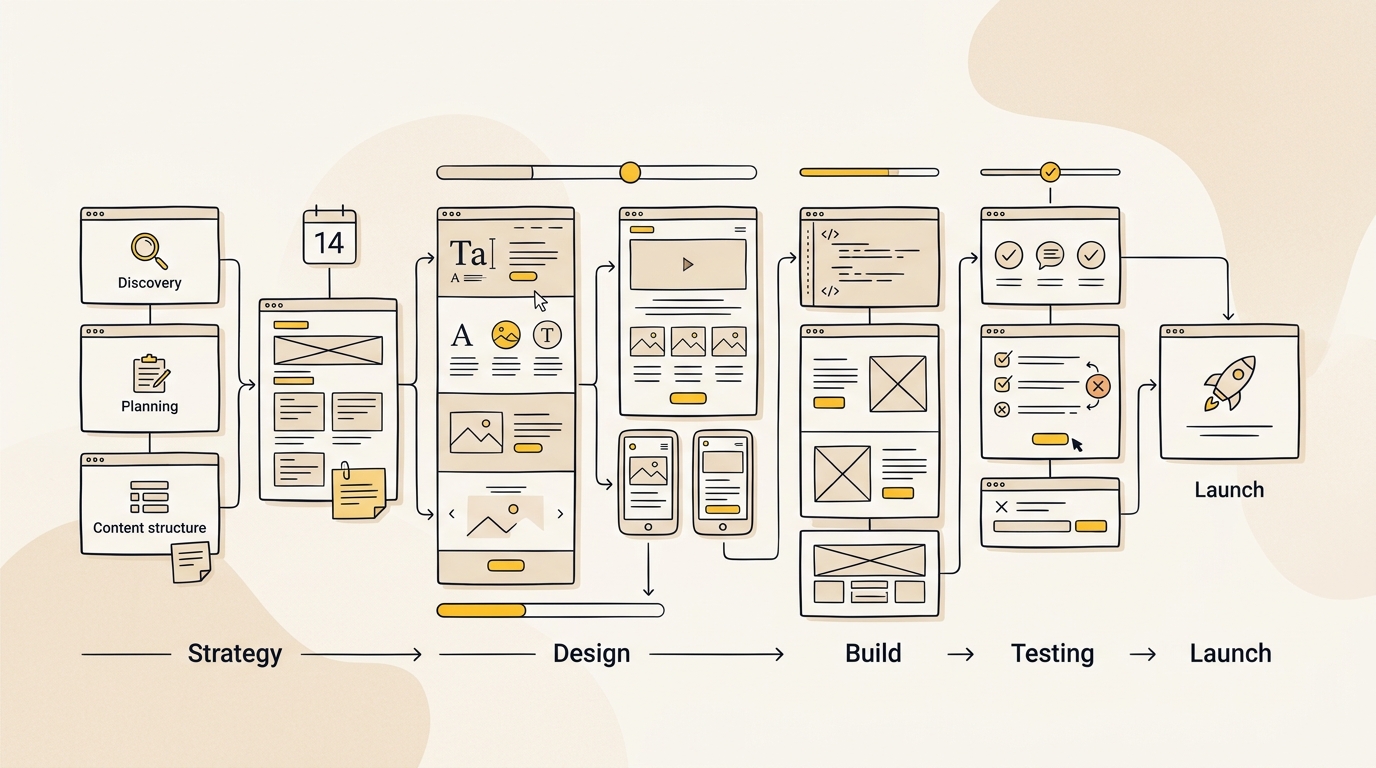
A realistic website redesign timeline is about 4 to 8 weeks for a focused small site, 8 to 16 weeks for a mid-sized redesign, and 16 weeks or more for a complex rebuild or e-commerce project. Those are planning ranges, not promises: page count, content readiness, integrations and how quickly your team approves decisions all affect the finish date. If you have a fixed launch, start with the work that must be ready before development, not an optimistic estimate of how fast a site can be built.
Design decisions shape the schedule as much as code does. Clear page priorities, real content and reusable layouts reduce rework, while late copy, scattered feedback and new features can push a launch back. If you are weighing scope against your date, review DesignFIT’s website design service alongside the timeline below.
Website redesign timeline at a glance
Use these ranges to set an initial expectation, then adjust them after a project team has reviewed your current site, content and technical requirements. A five-page refresh and a 50-page replatform are not the same job, even if both are called a redesign.
| Project size | Typical scope | Planning range | Common schedule pressure |
|---|---|---|---|
| Small, focused redesign | About 5 to 15 pages, existing CMS, limited integrations | 4 to 8 weeks | Content, photos, feedback and launch checks |
| Mid-sized growth redesign | About 15 to 45 pages, custom layouts, more content and integrations | 8 to 16 weeks | Page approvals, content migration and stakeholder decisions |
| Large or complex rebuild | 45 or more pages, e-commerce, platform change or custom integrations | 16 weeks or more | Data, technical dependencies, migration and testing |
These ranges are broadly consistent with the project-size breakdowns in Skydea’s website redesign timeline guide, Connective’s redesign timeline overview and Phenomenon Studio’s project timeline article. Their estimates are useful as starting points, but your scope and team’s availability matter more than a published average.
Treat the launch date as a project constraint, not a reason to skip strategy, content planning or quality checks. A staged release can be a better choice than trying to finish every page and feature at once.
What you need before you set a launch date
Before you promise a date to your leadership team, make a list of what must be decided, supplied or approved. A timeline is only realistic when it includes work by both your design and development team and your own organisation.
1. A clear reason for the redesign
Write down what the new site needs to do better. Is the priority more qualified enquiries, easier online purchasing, clearer service information, a new brand, a new platform or support for a product launch? Pick a primary outcome and a small number of supporting goals.
That focus affects the design. If qualified leads matter most, the team may prioritise service pages, proof and enquiry forms. If the site supports a product release, the key page, product story and launch campaign may come first. Without a shared goal, every department can introduce another “must-have” page or feature.
2. A firm owner for decisions
Choose one person who can make routine decisions and collect feedback from other stakeholders. That person needs access to the people who approve budget, brand, content and technical choices. If approval requires a committee, agree in advance who has the final say when comments conflict.
A project owner does not have to write every comment. Their job is to turn separate opinions into one useful response. Ask contributors to explain the problem they see, rather than prescribing a new design. “Customers cannot tell which locations offer this service” is actionable. “Make this section pop” is not.
3. A content and asset plan
Make an inventory of existing pages, copy, images, downloadable files, forms and any content that must be retained. Mark what will be reused, rewritten, combined, removed or created from scratch. Identify who owns each item and when they can deliver it.
Content is part of design, not decoration added after the layout is approved. Copy length affects hierarchy and page structure. A headline that needs three lines can change the size and balance of the hero. Product images, staff photography and diagrams can affect the composition, accessibility and speed of a page.
4. A technical and search review
List the platforms and tools the site depends on: content management system, forms, analytics, customer relationship management system, booking software, product catalogue, payment provider and any custom connections. Find out who can provide access and documentation.
Also record important current URLs and pages that bring in visits, enquiries or sales. A redesign can change addresses and navigation. Planning what should happen to old URLs is part of protecting the experience for visitors and search engines, not a final-week admin task.
5. A launch window with room to test
Set a target date, but reserve time before it for review, testing and fixes. Avoid scheduling a major launch immediately before a public holiday, a seasonal sales peak or a period when decision-makers are unavailable. If the date cannot move, define what the first release must contain and what can safely follow later.
For a broader discussion of scope and budgeting, see the small business website redesign cost guide and DesignFIT’s pricing information. Cost and timeline are connected: adding pages, integrations or custom behaviour usually adds work, but the exact effect depends on what is already in place.
Step 1: Define the launch scope before design begins
Start by separating the complete wish list from the work required for launch. Make three lists: must launch, valuable soon after launch, and ideas to investigate. Keep the first list small enough to complete and test properly.
A must-launch list might include the homepage, core service pages, a key campaign landing page, contact or booking flow, privacy information and the navigation that connects them. A later release could add lower-priority articles, secondary case studies, extra filters or new interactive tools. The right split depends on how people use your site and what the business needs on launch day.
This is where data should inform design priorities. Review analytics, search data, enquiries and feedback from customers or staff. Which pages are visited before an enquiry? Which tasks do people struggle to complete? Which search terms bring the right audience? Use these signals to guide page order and navigation instead of assuming the homepage deserves all the attention.
Make a page list with a named owner and status for every page. A spreadsheet is enough. Include the page purpose, audience, primary action, content status and whether it needs a new template. That inventory makes hidden scope visible before the team has committed to a schedule.
Tip: Agree what “done” means for the first release. A page is not finished just because its design is approved. It may still need copy, images, responsive behaviour, links, metadata, accessibility checks and approval from the person responsible for the information.
Mistake to avoid: Estimating only by the number of URLs. Ten pages using one well-planned template may be simpler than five pages with unique layouts, calculators, gated content or complex forms.
Step 2: Audit the current site and map the visitor journey
The team needs to know what is worth keeping and what is getting in the way. Review the current site’s page structure, visual patterns, navigation, mobile layouts, forms and content. Look at the site as a customer would, not just as an organisation familiar with its own terminology.
Trace a few important journeys. For a service business, that could be arriving from a search, comparing services, checking proof and sending an enquiry. For an online store, it could be finding a category, filtering products, reviewing a product page and completing checkout. Note every point where a visitor has to guess what to do next.
This is a design task with practical schedule benefits. If the team agrees early on the journey and page priorities, it can make informed layout choices before detailed visual design begins. If the navigation is still being debated after page designs are built, the team may need to redo both the design and the development.
Create a simple sitemap showing the proposed structure. Group related services or products in a way that makes sense to customers. Keep labels familiar and specific. Internal department names may be meaningful to staff but can confuse people who are trying to solve a problem quickly.
Tip: Look at mobile screens during the audit, not after desktop designs are complete. A navigation pattern that works with a mouse may be cumbersome on a narrow screen. The order of information, button size, form fields and sticky elements all influence the mobile experience.
Mistake to avoid: Copying the old sitemap without checking whether it serves current business goals. A redesign is a chance to remove redundant pages and clarify important paths, but deleting pages without a search and content review can create avoidable problems.
Step 3: Shape the content and page templates together
Before polishing the interface, decide what each important page needs to say and what action it should support. Draft or gather real copy for priority pages, even if it is not final. If writing cannot be completed immediately, agree on the intended content sections and approximate length.
A designer can then build a hierarchy that gives the most important information the strongest place on the page. That might mean a clear value proposition, a relevant image, proof, service details and one primary call to action. The order should respond to what visitors need to know, rather than following a generic template blindly.
Create a small set of page types. For example, a site might need a homepage, service page, location page, article page and contact page. Each type can have its own structure, but repeated elements such as calls to action, testimonial cards and feature blocks should behave consistently.
This is a useful point to test whether the design system is helping the schedule. Reusable components reduce the need to invent each page from scratch and make later changes easier. They also create consistency. A visitor should not have to relearn how buttons or navigation work on every part of the site.
Tip: Use real headlines and representative copy in wireframes. If the actual content is not ready, mark its purpose and length clearly. Placeholder text often hides problems that become obvious only when the finished copy arrives.
Mistake to avoid: Approving a beautiful homepage while the other page types remain undefined. The homepage alone cannot tell you whether the system supports a detailed service page, a location page or a product comparison.
Step 4: Design, review and approve in focused rounds
Once page structure and content direction are agreed, move into visual design. Start with the elements that establish the system: typography, colour, spacing, image treatment, buttons, navigation and reusable sections. Then apply that system to the most important page types.
Good design is not simply a fresh colour palette. Visual hierarchy helps people understand what the business offers, what matters on a page and what action to take. A consistent brand builds recognition. Readable type, thoughtful contrast and useful spacing support access and comprehension. Relevant imagery can clarify a service or product, while lightweight image choices help avoid unnecessary performance costs.
Set the review process before the first presentation. For each round, say what is being reviewed, who needs to comment and when a consolidated response is due. Ask reviewers to focus on agreed criteria: Does the page answer the customer’s question? Is the next step obvious? Does the layout support the priority content? Is the design consistent with the brand?
A practical sequence is to approve the overall direction, then the key templates, then the content in those templates. Small details such as an icon or minor spacing adjustment can be resolved later, but changes to the audience, structure or primary journey can affect the whole project.
The website redesign timeline guide from UPQODE also highlights the importance of project management and review coordination. The useful lesson is straightforward: feedback time belongs on the schedule. It is not spare time the delivery team can assume will happen instantly.
Tip: Ask the project owner to return one clear set of comments within an agreed review window. When several people send separate feedback, consolidate it before it reaches the design team.
Mistake to avoid: Treating each review as permission to reopen every earlier decision. If a strategic choice needs to change, record why, who approved it and what part of the schedule or scope it affects.
Step 5: Build the site and prepare the content
After the main design direction is approved, the team builds page templates and components in the chosen platform. Development and content preparation can overlap when the structure is stable, but avoid populating dozens of pages against a template that is still changing.
The build includes more than reproducing a desktop mock-up. It needs to work at different screen sizes, handle real content, support the agreed interactions and connect to the tools the business uses. Forms need to send information to the right place. Navigation needs to work by keyboard and touch. Reusable page sections need sensible limits so that editors can maintain a consistent experience.
Content migration also takes planning. Existing pages may have different formats, image sizes, headings or links. Decide whether the team will copy content manually, import it, rewrite it or remove it. Check who is responsible for each step and how the migrated page will be reviewed.
If content is not ready, keep moving on work that does not depend on it. The team can build approved templates and complete agreed integrations while writers finish copy. But do not treat an empty page as a finished page. Long, short or missing content can change the layout and require design adjustments.
Tip: Agree a content cut-off for the launch version. Items arriving after that point may be placed in a later release unless they are essential. This gives writers a clear deadline and protects the final review period.
Mistake to avoid: Adding a new feature during the build without checking its impact. A calculator, new user account flow or additional integration can involve design, development, content, privacy review and testing. Put non-essential ideas in a later-phase list.
Step 6: Test the complete experience, not just the appearance
Testing needs to cover real pages and real tasks. Check the site on common screen sizes and browsers, follow the main visitor journeys, submit forms, test links and confirm that important content displays correctly. Review error messages and empty states, not only the ideal path through a page.
Ask someone who was not involved in the design to try a few important tasks. Can they find the right service? Can they tell what happens after they submit a form? Can they select a product and understand the next step? Their questions can reveal confusing language or hierarchy that the team has stopped noticing.
Include accessibility checks in this stage and throughout design. Review keyboard access, heading structure, text alternatives for meaningful images, contrast and form labels. A late accessibility review can reveal structural changes, so build these considerations into decisions from the start.
Check page performance with the real images, fonts and scripts that will be used at launch. Large visual assets and unnecessary effects can slow a page and make it harder to use, especially on mobile connections. Performance is a design and build consideration, not a final score to chase after the interface is complete.
Use a written issue list. Give each problem a severity, owner and status. Fix launch blockers first: broken primary flows, missing content, incorrect forms, serious accessibility issues and errors that prevent important pages from working. Separate these from enhancements that can be handled after launch.
Tip: Reserve a specific block of time for testing and fixes. If every available day is already committed to design and development, there is no realistic space to find and resolve problems.
Mistake to avoid: Testing only the homepage or asking the build team to confirm its own work without an independent check. The experience includes navigation, internal links, forms, search journeys and the pages people actually need.
Step 7: Plan the launch and protect continuity
A launch is a sequence of checks, not just a button press. Confirm who has access to the domain, hosting, content platform, analytics and connected services. Agree who can approve the release and who will be available if something needs attention.
Before launch, review the final URL list and identify where changed or removed pages should lead. Check that key tracking is working and that important forms reach the correct inbox or system. Confirm that the live site has the approved content, not draft text or temporary assets. Keep a record of the current site and the release plan so the team can investigate issues quickly.
After launch, test the live version again. Visit the important pages, submit the forms, check mobile behaviour and confirm that analytics and integrations are functioning. Monitor for problems and assign someone to handle fixes. A launch date is a milestone, not proof that every part of the site is working as intended.
Search visibility also needs attention when URLs or page content change. Create a list of old addresses, map relevant pages to their new destinations and check that the routes behave as expected. Avoid pointing every old address to the homepage if a more relevant destination exists. Keep the mapping documented so the team can diagnose traffic or user issues later.
Tip: Schedule the release when the people who know the site and its systems can be available. A Friday afternoon launch before a long weekend leaves less room to respond if an important issue appears.
Mistake to avoid: Leaving analytics, redirects, form routing or platform access until the final day. These tasks often depend on credentials, other teams or external providers, so identify them early.
Realistic timelines by project size
The schedule below is a guide to sequence, not a guarantee that every phase will take exactly the same number of weeks. Some work can run in parallel. Other tasks, such as approving the structure before building it, need to happen in order.
Small redesign: about 4 to 8 weeks
A small redesign usually suits a business with a relatively simple site, a stable platform and a limited number of page types. It may refresh the visual design, clarify the main journey and update a handful of priority pages without introducing complex integrations or a platform change.
A four-week plan is most plausible when the goal and page list are already clear, content and assets are available, the existing platform can support the work, and one person can approve decisions promptly. It is not a safe assumption for a project that still needs brand strategy, full copywriting, photography, new functionality or a migration.
A practical sequence might be:
- Week 1: Confirm goals, review the current site, agree the page list and sketch the core layouts.
- Week 2: Develop and approve the visual direction and key page templates. Supply final or near-final copy and imagery.
- Weeks 3 and 4: Build the templates, add content and test responsive layouts, forms and key links.
- Weeks 5 to 8, if needed: Complete additional pages, resolve feedback, check search and tracking requirements, fix issues and launch.
The critical design decision is how much to reuse. Keeping the existing platform and page structure can reduce the amount of work, but a superficial visual refresh may not fix confusing content or a weak conversion journey. Decide whether the project needs a new look, a better customer path or both.
Common delays include late photography, copy that changes after design approval, missing account access and feedback from several people arriving in separate rounds. If your business cannot supply content early, include writing and content review in the project plan instead of assuming they will happen in spare moments.
Mid-sized redesign: about 8 to 16 weeks
A mid-sized project commonly includes several page types, more substantial content work, custom design components and one or more connections to business systems. It may suit a growing service business, a multi-location organisation, a more established brand or a company whose site needs a clearer information structure.
A practical schedule could look like this:
- Weeks 1 to 2: Review the site, audience needs, analytics, search performance and competitors. Agree goals, page scope and approval roles.
- Weeks 3 to 4: Confirm navigation, key journeys and page wireframes. Draft or commission content for priority pages.
- Weeks 5 to 7: Design the visual system and key templates. Review the mobile experience and collect consolidated approvals.
- Weeks 8 to 11: Build templates, components and agreed integrations. Start adding approved content as templates become stable.
- Weeks 12 to 14: Complete content migration, check redirects and tracking, and test the main visitor journeys.
- Weeks 15 to 16, if needed: Resolve defects, complete final approvals and release the site with a post-launch monitoring plan.
The important design choice is whether the site needs a reusable component system or a collection of one-off pages. Reusable patterns make the experience more consistent and can help the internal team publish future content without inventing new layouts each time. But components still need clear rules. Too much flexibility can create inconsistent pages; too little can make every new request a custom development task.
The common schedule risk is a slow decision process. Marketing, sales, leadership and subject experts may all have useful input, but they should not all be informal final approvers. Agree who makes decisions and how feedback is consolidated. Another risk is underestimating content: even when page templates are ready, each page still needs accurate, approved information.
Large or complex rebuild: 16 weeks or more
A large project may involve many page types, an e-commerce catalogue, a platform change, custom integrations, several markets or a large group of stakeholders. The work can extend beyond 16 weeks, particularly when there are complex systems or data that need to move. A project with a hard date should be scoped carefully before anyone commits to a precise finish.
A typical sequence could include:
- Weeks 1 to 4: Technical discovery, stakeholder interviews, content and URL audit, system mapping and definition of the launch scope.
- Weeks 5 to 9: User journeys, navigation, prototypes and design of key templates, including product, category, checkout or account flows where relevant.
- Weeks 10 to 18: Build the platform, templates and integrations. Test data and system connections as they are developed rather than waiting until the end.
- Weeks 19 onward: Migrate or prepare content and product data, validate redirects, test key workflows, train editors and plan the release. The exact duration depends on how much data and functionality is involved.
For e-commerce, product discovery and checkout deserve particular design attention. Filters must make sense to shoppers, product information needs to answer real questions, and the route from product selection to payment should be clear. The design needs to account for real catalogue data, stock states, delivery information and errors, not only the ideal product page.
A platform change adds work because content, data structures, integrations and URLs may not transfer in the same shape. Do not assume a migration is just moving text from one editor to another. Identify what will move, what will be rebuilt, what will be retired and who can verify the results.
The biggest risk is a project with an ambitious scope and no technical discovery. Inventory, pricing, permissions, custom data and older integrations can contain exceptions that are not visible in a design presentation. Identify those dependencies early and make the launch plan reflect them.
What slows every website redesign timeline down?
Content arrives after the layouts are approved
When copy is written after design, it may not fit the page structure. A short headline can leave a section without enough context, while a long description may push the call to action far down the page. The team then has to choose between rewriting content, changing the layout or accepting a compromised result.
Prevent it: Draft priority copy alongside wireframes. Where final wording is not available, set a clear content outline and length range for each section. Assign an owner and due date to every page.
Feedback is fragmented or late
Different stakeholders may share contradictory comments in meetings, email and chat. The design team cannot confidently act on them until someone resolves the disagreement. Each new round then creates more waiting and makes it harder to tell which version is current.
Prevent it: Use one feedback channel and one project owner. Agree response windows and define which decisions need wider consultation. If an approver is unavailable, appoint a delegate before the project starts.
New features appear during the build
An added calculator, booking flow, members area, language option or integration can change the design and technical scope. Even a feature that sounds small may require content, permissions, data handling and testing.
Prevent it: Keep a phase-two list. When a new request appears, record the customer problem it solves, the effort required and whether it is essential for launch. Add it to the first release only after the owner agrees what work will move or what date will change.
Platform and integration details are discovered late
A design may rely on a feature that the existing platform cannot support without extra development. A form may need to send different information to several systems. A product catalogue may contain inconsistent fields. These are not cosmetic details, and they can create a new dependency late in the schedule.
Prevent it: Include a technical review before final design approval. Give the delivery team access to the platform and relevant system owners early. Test uncertain integrations with a small proof of concept where appropriate.
Search and measurement are left to the end
Changing pages without tracking important URLs can make it difficult to maintain a coherent visitor journey. Missing analytics events can also leave the marketing team unable to tell whether key actions are working after launch.
Prevent it: Record important current pages, agree how they map to the new structure and identify the actions you need to measure. Include those requirements in the build and test plan, rather than adding them after release.
How to hit a fixed launch date without making the redesign worse
If your date is immovable, reduce uncertainty and scope before cutting essential quality checks. A rushed project is not automatically a fast project. It may simply move unanswered questions into the build, when changes cost more time and attention.
Use this sequence:
- Work backwards from the date. Reserve time for testing, launch preparation and fixes. Do not allocate every week to new design or build work.
- Define the minimum useful launch. Identify the pages and actions that customers need on day one. Consider which secondary pages can follow in a planned later release.
- Freeze the core decisions early. Confirm the audience, navigation, primary page templates, platform and launch features before the team builds them.
- Get content moving immediately. Assign owners and due dates. Treat photography, product information, legal copy and approvals as project tasks, not informal requests.
- Use a single decision owner. Consolidate feedback and make sure the right approvers are available when needed.
- Track dependencies visibly. Keep a list of items that could block launch, such as access, integrations, content, domain settings or external approvals.
- Agree what can move. If a dependency slips, decide whether to reduce scope, change the date or add appropriate resources. Do not pretend the plan is unaffected.
A phased launch is often the most sensible compromise. Release the most useful customer journeys first, then add planned improvements in later rounds. The first release still needs to feel complete for the tasks it supports. A clear, focused site is better than a large site full of unfinished sections.
How to estimate your own website redesign timeline
Use this checklist before accepting a proposed launch date:
- Are the project goals and success measures clear?
- Is there a page inventory with priorities and named owners?
- Do we know which pages and content are being reused, rewritten or removed?
- Are the design and technical decision-makers available during the project?
- Is there a single person who can consolidate and approve feedback?
- Have we identified platform changes, integrations, data migration and special functionality?
- Is content being created alongside design, with dates and owners?
- Have we allowed time for mobile, accessibility, content and integration testing?
- Have we planned URL changes, redirects, analytics and launch access?
- Is there a clear list of features that can wait until after launch?
If several answers are no, the first task is discovery and planning, not promising a short build. Ask a prospective design partner to explain dependencies and assumptions behind its estimate. A useful estimate should say what is included, what your team needs to provide, how approvals work and what happens when scope changes.
Refresh, revamp or redesign: which schedule applies?
The word “redesign” can describe very different amounts of work. A refresh updates visual details within existing page structures. A revamp changes important layouts or journeys while keeping much of the current platform. A redesign may rethink the information architecture, content, visual system and technology together.
These labels are not formal standards, so compare the deliverables rather than the name. Ask whether the work includes research, copy, new templates, migration, integrations, search planning and testing. A project called a refresh can take longer than expected if the content or technical foundations are in poor shape.
As a rough planning distinction, a narrow visual refresh may fit a short schedule when the content and structure are stable. A broader revamp needs time for page and journey decisions. A full redesign or replatform needs discovery, migration and more extensive testing. The project should be estimated from the actual work, not the label.
Frequently asked questions
Wrap-up: plan the work that protects the launch
A website redesign timeline is shaped by scope, content, design decisions, technical dependencies and the speed of approvals. Small projects can sometimes move quickly when the goals, assets and platform are ready. Larger projects need more discovery, migration and testing, and a fixed launch date may call for phased delivery.
Start by setting the launch scope, naming a decision owner and making content part of the design process. Then build in time to test the actual customer journeys and prepare the release. If you are planning a redesign, explore DesignFIT’s website design service and review pricing to discuss a scope that fits your goals and launch window.
Key takeaway
A realistic website redesign timeline comes from setting clear scope, preparing content early and protecting time for decisions, testing and launch.
Questions people ask
Can a website redesign really be done in two to four weeks?
A limited visual refresh may fit that window if the structure, content and platform are already settled. A research-led redesign with new journeys, content work, custom design and launch checks needs more time, so confirm exactly what is included before agreeing to the date.
What is the difference between a website refresh and a redesign?
A refresh usually updates visual details while retaining most page structures. A redesign can also change the site architecture, content, customer journeys and technology, so it needs more discovery and delivery time.
Does changing website platforms add time to a redesign?
Usually, because the team must account for content and data migration, platform-specific templates, integrations and changed URLs. The amount of extra work depends on the platforms involved and how much custom functionality the current site uses.
How can we meet a fixed website launch date?
Define the minimum useful launch, make decisions through one owner and start content work early. If the complete scope will not fit, release the priority pages and journeys first, then schedule the remaining work as a planned next phase.


