Shopify Hydrogen Solutions: Is Headless Right for You?
A practical comparison of custom Hydrogen builds and Shopify Liquid themes, with costs, trade-offs and a clear verdict by business situation.
On this page
- What are Shopify Hydrogen solutions?
- What are you comparing, and why?
- Criterion 1: Design freedom and brand experience
- Criterion 2: Speed and Core Web Vitals
- Criterion 3: Apps and integrations
- Criterion 4: Content editing and marketing agility
- Criterion 5: SEO, AI search and checkout
- Criterion 6: Build cost and total cost of ownership
- Criterion 7: Maintenance and team capability
- Pros and cons: Liquid versus Hydrogen
- Which should you choose?
- A practical decision checklist
- What to ask an agency before signing
- The verdict
Shopify Hydrogen solutions are custom React storefronts that connect to Shopify through its Storefront API. They offer more freedom over the front end, but they are not automatically faster, better for conversion or cheaper to run than a well-built Shopify Liquid theme. For most growing retailers, Liquid is the more practical starting point unless a specific technical or operational need makes headless worthwhile.
The key decision is not whether custom code sounds more advanced. It is whether your store has a real constraint that Liquid cannot solve, and whether the extra engineering and maintenance will repay its cost. If you are comparing a rebuild, start with the actual user and business problem, then review the options for Shopify website design before committing to a new architecture.
This guide compares Shopify Hydrogen solutions with custom Online Store 2.0 Liquid themes across design freedom, speed, apps, marketing control, SEO, costs and long-term ownership. The cost figures are planning ranges, not guaranteed quotes or universal market averages. Project scope, integrations, data migration and team structure can move them substantially.
What are Shopify Hydrogen solutions?
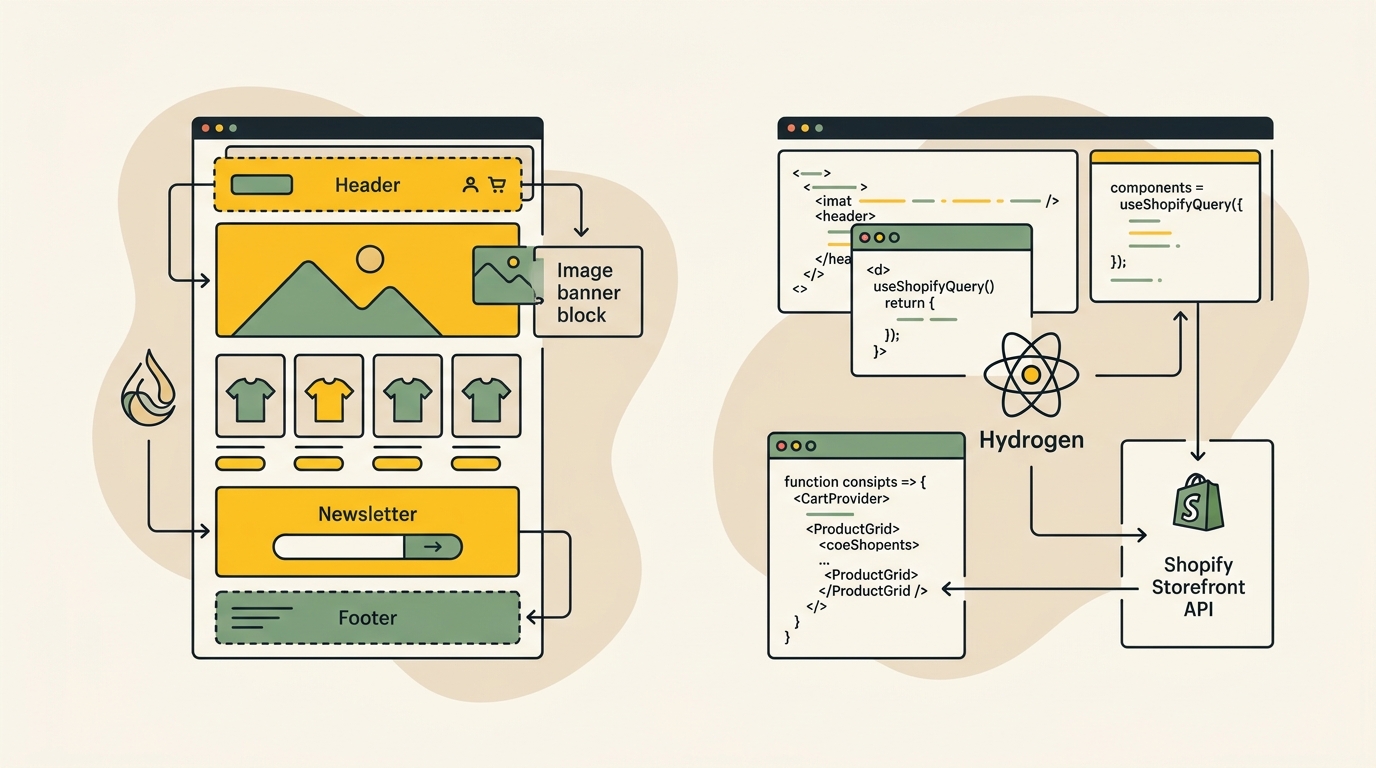
Shopify Hydrogen is Shopify’s React-based framework for building custom storefronts. A Hydrogen site fetches product and store data through Shopify’s Storefront API, while Shopify continues to handle commerce services such as products, inventory and checkout. Oxygen is Shopify’s hosting platform for Hydrogen storefronts. See Shopify’s Hydrogen fundamentals documentation for the current technical overview.
A Liquid theme is the storefront format used by Shopify’s standard online store. Shopify renders Liquid templates on its platform, and store staff can use the Shopify theme editor to arrange sections, edit content and manage many visual settings without writing code.
With either option, the customer can still complete their purchase through Shopify checkout. Headless changes the storefront architecture, not the underlying fact that Shopify is providing the commerce platform.
| Custom Liquid theme | Hydrogen storefront | |
|---|---|---|
| Front end | Shopify theme using Liquid, HTML, CSS and JavaScript | Separate React application using Shopify APIs |
| Content editing | Shopify theme editor, pages, blogs and metafields or metaobjects | Often needs a headless CMS or a custom editing workflow |
| Hosting | Shopify-hosted storefront | Oxygen or another hosting provider, subject to current plan and hosting terms |
| App installation | Many apps can use theme app extensions, embeds or documented integrations | Each app needs to support the headless setup or be integrated separately |
| Checkout | Shopify checkout | Typically hands off to Shopify checkout |
| Best fit | Most stores wanting a tailored, manageable storefront | Stores with a clear need for custom architecture and development capacity |
The difference matters day to day. With Liquid, the theme is part of the Shopify store. With Hydrogen, the storefront is a separate application connected to Shopify. That separation can be useful, but it creates more components to design, build, test and maintain.
What are you comparing, and why?
The comparison is between a well-designed, custom Liquid theme and a properly engineered Hydrogen build. It is not fair to compare a rushed, app-heavy theme with a carefully optimised headless site, or a poorly executed Hydrogen project with a mature Liquid store. For an architectural breakdown of both environments, see 21phi’s comparison of Shopify Hydrogen vs Liquid themes.
Both approaches can produce a distinctive brand experience. Both can have a carefully considered product page, clear navigation, responsive layouts and accessible interactions. The architecture changes how those designs are built and maintained, not whether good design is possible.
The useful question is: which setup lets your team improve the customer experience without adding more cost and friction than the improvement is worth?
Before choosing, write down the problem you want to fix. For example:
- Mobile product pages feel slow, especially after third-party scripts load.
- The theme cannot support a product configurator or a complex purchase flow.
- Marketing needs to make frequent changes but has to wait for a developer.
- Your team wants to serve the same product data to a website, app and other channels.
- A campaign needs a more expressive layout than the current theme can support.
These problems do not all point to Hydrogen. Slow pages may need image and script optimisation. A campaign layout may need a better Liquid theme system. A true cross-channel product experience may justify a separate storefront application. Diagnose first, then choose the smallest architecture that solves the constraint.
Criterion 1: Design freedom and brand experience
Does Hydrogen make a store look better?
Hydrogen gives developers direct control over the React front end. That can make it easier to build custom interfaces, rich interactions, highly tailored navigation or a storefront that shares components with other digital products. It can also support a design system that does not fit neatly into a conventional theme structure.
But more technical freedom does not guarantee better design. A Liquid theme can be designed around a brand’s typography, colour, imagery, product hierarchy and shopping flows. Online Store 2.0 themes use modular sections and blocks, so a designer can create flexible page structures while leaving approved content changes in the theme editor.
A product page does not become more persuasive because it was built in React. It becomes more useful when the information is ordered well, product options are understandable, photography answers shoppers’ questions, and the calls to action are easy to find. Those design decisions are possible in either architecture.
Where Liquid can feel restrictive
A theme can limit the design if it is poorly chosen, heavily modified without a system, or packed with settings that make the editor confusing. A low-cost theme may not match a brand’s needs. For more on evaluating themes, see our guide on Shopify custom theme vs premium theme. A custom theme can also become brittle if every new campaign requires a developer to edit hard-coded templates.
The answer is not necessarily headless. A bespoke Liquid theme can use reusable sections, defined design tokens, metafields or metaobjects for structured content, and carefully scoped settings. The result can be custom and distinctive while preserving useful editing controls.
For example, a retailer may need seasonal landing pages with different hero layouts, editorial content and curated product groups. A Liquid build can provide a set of approved sections that the marketing team can combine. Hydrogen can do the same, but the team may need a separate CMS and preview workflow to edit those pages. Neither is inherently the better design; the right question is which editing model suits the people who will use it.
When Hydrogen’s design freedom is valuable
Hydrogen deserves consideration when the storefront must behave like a custom digital product, not just present products in a highly branded way. That might include a complex product builder, unusual navigation tied to multiple data sources, or a front end shared with other applications.
Even then, check whether the desired experience depends on the architecture or can be built as a focused feature within Liquid. A single unusual interaction does not automatically justify rebuilding every page as a separate application.
Criterion 2: Speed and Core Web Vitals
Is Hydrogen faster than Liquid?
Not by default. Hydrogen gives a development team control over how pages are rendered and what code is sent to the browser. That control can help when the team uses it well. It can also lead to large JavaScript bundles, slow data requests, hydration work and extra complexity that hurts the real user experience.
Shopify’s engineering team has compared Liquid and headless storefront performance in its discussion of Liquid versus headless web performance. The practical lesson is that architecture alone does not determine speed. Implementation choices and the actual customer experience matter.
Core Web Vitals are field measures of loading, interactivity and visual stability. A good score is useful, but do not treat a Lighthouse score from one test as proof that shoppers have a faster or more effective experience. Lab tests and real-user data answer different questions. Check real mobile devices, important templates, third-party scripts and actual analytics where available.
What usually slows down a Shopify store?
Before planning a headless rebuild, inspect the current site for common sources of delay:
- Large or incorrectly sized product and campaign images.
- Video or animation that loads before it is needed.
- Too many third-party scripts, including advertising pixels and chat tools.
- Apps that add front-end code across pages where they are not used.
- Fonts or scripts that block important page content.
- A product page that loads too much information or too many recommendations at once.
- Poorly managed theme customisations that create duplicate or unused code.
These issues can often be addressed within Liquid. A measured speed review should identify the templates and scripts responsible before anyone recommends replacing the storefront. See our guide to Shopify speed optimisation through design for a practical way to think about that work.
What can Hydrogen improve?
A skilled team can choose how and when data is fetched, shape the page’s rendering strategy and reduce reliance on unnecessary theme code. That may be useful when a particular page or experience cannot meet its requirements in the standard storefront architecture.
But the team must also manage the costs of those choices. API calls, caching, client-side code, image delivery and third-party services need to be tested together. A custom site that looks fast in a narrow demo can still feel sluggish on a real phone over a weaker connection.
The right comparison is not “Liquid is slow, Hydrogen is fast”. It is the current store’s measured performance against a realistic proposed build, using comparable pages, devices and conditions. Ask the agency to explain what it will measure, how it will test and how it will keep the result from degrading after launch.
Criterion 3: Apps and integrations
Can you use Shopify apps with Hydrogen?
Some apps can work with a headless storefront, but do not assume that a Shopify app’s theme integration will appear automatically. In a Liquid theme, an app may provide a theme app extension, an app block or an embed. In Hydrogen, that theme component generally cannot simply render as a normal section. The app needs a compatible API, a supported headless integration or a custom front-end implementation.
That difference matters for tools such as reviews, search, subscriptions, loyalty, product recommendations, customer support and email capture. Before approving a Hydrogen proposal, list every app the store relies on and ask the vendor to show exactly how each one will work.
| Store function | Liquid theme | Hydrogen storefront |
|---|---|---|
| Reviews | May be available through an app block or theme extension | Confirm API or headless component support; otherwise plan custom work |
| Search and filters | Theme features or compatible app integrations | Confirm data access, filter behaviour and front-end implementation |
| Subscriptions | App may provide a supported theme flow | Test product, cart and checkout handoff with the subscription provider |
| Loyalty and rewards | Theme app extension may be available | Check whether the app supports headless storefronts and required customer states |
| Email capture | Often available via an embed or theme app extension | Build or integrate the form and confirm consent and event tracking |
| Analytics and advertising | Theme integrations and pixels still need careful governance | Events may need custom implementation and validation across the storefront and checkout |
A Shopify app listing is not proof that the app supports Hydrogen. Ask the app provider and the development team to confirm the exact integration, its limitations and who maintains it when the app changes.
The hidden cost of custom integrations
A custom integration costs more than the first coding task. It also needs testing, documentation, error handling, monitoring and future updates. If the app changes its API or the store changes its product model, the custom component may need work too.
That does not make custom integrations a bad choice. They can create a smoother experience or remove unnecessary third-party scripts. But count the ongoing work, not just the launch effort. A store with many important app-driven features may find Liquid much more efficient because supported integrations are already available in the theme ecosystem.
Criterion 4: Content editing and marketing agility
Who can make a landing page change?
This is one of the most important questions in the comparison. With Liquid, the Shopify theme editor can give trained staff control over approved sections, content and page layouts. The exact controls depend on how the theme is designed, but a strong implementation can let marketers make routine changes without editing code.
Hydrogen does not automatically include the same visual editing experience. A team can build custom editing controls or connect a headless CMS such as Sanity, Contentful or Prismic. That can be a good fit for complex publishing workflows. It also adds a product to configure, license where applicable, train staff on and maintain.
If a marketing team needs to change a hero image, reorder a collection, add campaign copy or publish a landing page, test how that task works before choosing headless. A polished Figma prototype is not a substitute for an editing workflow that real staff can use.
The developer-ticket test
Ask each supplier to demonstrate three ordinary tasks using the proposed system:
- Add a new campaign landing page using approved sections.
- Change the order of featured products and update a promotion.
- Preview a draft on mobile and publish it without affecting other pages.
Ask who can do each task, whether a developer is required, how long it takes and what happens if the content needs to be rolled back. This simple exercise exposes a common mismatch: a technically flexible system may still be operationally rigid for the marketing team.
When you compare proposals, consider the cost of a Shopify redesign alongside the workflow you will own after launch. The cheapest build can become expensive if every small change needs specialist help.
Criterion 5: SEO, AI search and checkout
Does Hydrogen improve SEO?
Hydrogen does not guarantee better search rankings. A storefront needs crawlable content, clear information architecture, useful product and category pages, sensible internal links, accurate metadata, structured data where appropriate and a good mobile experience. Those tasks can be handled in either architecture, but their implementation and quality need to be checked.
A Liquid store can serve semantic page content through Shopify’s standard storefront. A Hydrogen team can also render content in a way search engines can access, but it must configure rendering, metadata, canonical URLs, redirects, structured data and sitemap behaviour correctly. A poorly configured headless build can create indexing problems just as a poorly configured theme can.
Ask for a search migration plan if the project changes URLs or page templates. It should cover URL mapping, redirects, canonical tags, product availability, pagination, structured data and testing in Search Console. The answer should be specific to your store, not simply that the new technology is SEO-friendly.
What about AI search and agents?
A store can make product information easier to interpret by publishing clear text, stable product details and structured data. That work is not exclusive to Hydrogen. Do not choose headless based on a claim that AI search visibility requires it unless the supplier can identify a concrete feature or integration your business needs and explain how it will be maintained.
Shopify’s developer documentation is the place to check current Hydrogen capabilities and architecture. For broader questions about making website information understandable to AI systems, see our guide to website design for AI search. New AI features and standards can change, so verify availability and limitations against the official documentation at the time of the project.
Does the checkout change?
In a typical Hydrogen setup, the storefront hands the shopper over to Shopify checkout. That means the team needs to test the transition carefully: cart contents, discounts, customer expectations, tracking and the visual continuity of the journey. A custom product experience on the front end does not mean every part of the purchase flow is custom.
Checkout usability deserves its own review. Baymard Institute’s checkout usability research documents common usability issues in checkout flows. Use research like this to inspect real friction points rather than assuming a new front-end framework will fix checkout problems.
Criterion 6: Build cost and total cost of ownership
How much do Shopify Hydrogen solutions cost?
As a rough Australian planning estimate, the supplied project ranges for a custom Liquid theme are about $12,000 to $35,000 AUD for design and build. A custom Hydrogen project is estimated at about $65,000 to $180,000 AUD or more. These are broad indicative ranges, not verified industry averages or a quote. Scope, team, data complexity, integrations, content migration and quality assurance can shift the price.
A Hydrogen project may also need a separate CMS, custom integrations and a development retainer. A Liquid project may need an app budget, theme improvements and ongoing optimisation. Compare all of those costs, not just the initial build price. For a second perspective on how agencies frame Hydrogen project costs, see Contentgrip’s Hydrogen cost-benefit analysis, and ask suppliers to itemise their own assumptions.
| Cost area | Custom Liquid theme | Hydrogen storefront |
|---|---|---|
| Initial design and build | Indicative range: $12,000 to $35,000 AUD | Indicative range: $65,000 to $180,000+ AUD |
| CMS | Shopify’s native content tools may be enough for many stores | A separate CMS may be needed, depending on the editing workflow |
| App integrations | Many common theme integrations are available, but check each app | Budget for headless-compatible integrations or custom development |
| Hosting | Shopify-hosted storefront, subject to the store’s plan | Oxygen or an external host; check current eligibility, terms and likely operating costs |
| Ongoing development | Theme updates, optimisation and campaign support | React, API, hosting, integrations and dependency maintenance |
| First-year total | Estimate depends on build, apps and support | Estimate depends on build, CMS, integrations, hosting and support |
The ranges above are deliberately not presented as a precise first-year total. A single total would imply certainty that does not exist without a scoped brief. In particular, a store with several custom integrations or a complex CMS workflow can be far more expensive than a simple Hydrogen launch.
Shopify Oxygen hosting costs and eligibility should be checked against current Shopify terms, as outlined in Storetasker's developer guide to Shopify Oxygen. Do not rely on a proposal that simply says hosting is free without specifying the store plan, expected traffic, service limits and what is included in the agency’s support.
Compare five-year ownership, not only launch price
A useful business case includes:
- Initial strategy, design, development and migration.
- CMS licences, app subscriptions and hosting beyond the Shopify subscription.
- Monthly engineering support and expected release work.
- Staff time for publishing and training.
- The cost of updating dependencies and testing integrations.
- The cost of fixing a poor launch or changing architecture later.
- The value of a faster or more effective shopping experience, if measured.
For Hydrogen to be worth the premium, identify the benefit you expect and how you will measure it. That might be a specific workflow that becomes possible, a measurable reduction in a documented performance problem, or one front end serving several channels. “More flexible” is not a financial outcome by itself.
Criterion 7: Maintenance and team capability
A Liquid theme is not maintenance-free. It needs ongoing attention to theme code, apps, analytics, accessibility and Shopify changes. But a standard theme often keeps more of the storefront workflow inside Shopify, where merchants and their designers already work.
A Hydrogen storefront has a separate codebase and its own release process. The business needs access to people who can work with the application, APIs, hosting and integrations. That can be an internal engineering team or a dependable external partner, but the capability must be available for everyday maintenance, not just launch.
Ask who owns the code and infrastructure, how deployment works, how errors are monitored, how updates are tested and how the store can be handed to another team. Confirm that documentation, source code, account access and environment settings are included in the project handover.
This is a business continuity issue as much as a technical one. If only one developer understands the storefront, the store has a key-person risk. A design that depends on a specialist for routine content changes can also slow marketing down, even if it is technically elegant. If you are navigating an enterprise architecture decision or platform rebuild, PADISO provides fractional CTO and AI transformation leadership to evaluate infrastructure before signing agency proposals.
Pros and cons: Liquid versus Hydrogen
To evaluate how these capabilities balance against long-term maintenance, review Flagship's guide to Hydrogen and Oxygen pros and cons.
Custom Liquid theme
Pros
- Keeps storefront editing within Shopify for many common tasks.
- Can support custom visual design and reusable campaign sections.
- Makes it easier to use compatible theme app extensions and embeds.
- Usually involves fewer separate systems and specialist skills.
- Can be a practical fit for retailers that need marketing teams to publish quickly.
Cons
- The theme architecture still needs thoughtful design and code quality.
- Some unusual interactions or cross-channel requirements may be difficult to support cleanly.
- Third-party apps can add code and slow pages if they are not managed.
- Poorly chosen themes or uncontrolled customisations can limit future changes.
Shopify Hydrogen solutions
Pros
- Gives developers broad control over the storefront front end.
- Can suit unusual customer experiences and custom commerce flows.
- Can be part of a wider architecture where multiple channels use shared commerce data.
- Allows a team to choose its rendering and component approach.
Cons
- Usually costs more to build and needs ongoing engineering support.
- Theme app blocks do not simply transfer to the separate storefront.
- Editing may require a CMS, custom controls or developer involvement.
- Adds more integration, deployment and testing responsibilities.
- Does not guarantee faster pages, higher conversions or better search rankings.
Which should you choose?
Choose custom Liquid if…
Choose a custom Liquid theme if the business needs a more distinctive storefront, better merchandising and a smoother editing experience, but does not have a specific requirement that forces a separate front end. This is often the sensible route when the store depends on a range of Shopify apps and the marketing team needs to launch campaigns without waiting on developers.
It is also the right first option when the complaint is simply that the site feels slow. Measure the current store, identify the scripts and templates causing the problem, and test targeted improvements before funding a full rebuild. If the existing theme is the constraint, improve or replace the theme rather than assuming Liquid itself is the cause.
Consider Hydrogen if…
Hydrogen may be appropriate when the store has a well-defined architectural need, such as an unusual product experience that is difficult to deliver in the theme, or a wider system in which several channels need to use shared commerce data. It is more compelling when the business has an engineering team or a sustainable development budget to support the application.
The business case should be written down before procurement. It should state the constraint, why a Liquid implementation is insufficient, which systems need integration, who will maintain the solution and what outcome will be measured after launch. If the supplier cannot explain those points plainly, pause the project.
Do not use annual revenue as the only rule
Revenue can indicate the resources available for a project, but it does not prove that a store needs headless. A retailer with significant sales may still benefit most from a well-designed Liquid theme, as echoed in merchant discussions on evaluating headless for scaling stores. A smaller business with an unusual product configurator or a genuinely multi-channel architecture may have a stronger reason to consider Hydrogen.
Use the operational facts instead: how often the team changes content, which apps are essential, where performance issues occur, what the storefront must do and who will own it. Revenue is a budget context, not an architecture decision.
A practical decision checklist
Before choosing Hydrogen, answer yes or no to each question:
- Can we name a storefront requirement that our current Liquid setup cannot reasonably support?
- Have we tested a custom Liquid theme or targeted theme improvements against that requirement?
- Do we know how every essential app will integrate with the proposed Hydrogen build?
- Can marketing staff publish, preview and revise pages without avoidable developer tickets?
- Have we budgeted for CMS, app integrations, hosting, engineering and ongoing testing?
- Is a named person or team responsible for maintenance after launch?
- Do we have a measurable goal beyond “more flexibility” or “better performance”?
- Is the expected benefit worth the additional cost and operational complexity?
If most answers are no, Hydrogen is probably premature. If the answers are yes and the project has a specific architectural reason, ask for a scoped discovery phase and a comparison with a Liquid alternative before approving the build.
What to ask an agency before signing
Ask the agency to show a proposed page in the editing system, not only in a design file. Have your marketing team try a realistic update. Ask for a list of apps and integrations, including which are native, API-based or custom-built.
Request a cost breakdown separating discovery, design, development, CMS setup, migration, integrations, testing and ongoing support. Ask what is excluded and what could trigger a change order. For a Hydrogen proposal, ask for the hosting plan, deployment approach, monitoring responsibilities and handover details.
Ask how the agency will measure whether the new site is better. Agree on a baseline and the pages to test. If conversion is the goal, define the measurement period and account for other changes such as promotions, traffic sources and product availability. If speed is the goal, define devices, page types and field or lab measurements. Do not accept a performance promise that has no testing method.
A useful proposal should also explain the fallback plan. What happens if an app integration proves more difficult than expected? Can the project launch in stages? Can the design system or content model be reused? Clear answers reduce the risk of discovering late in the build that the chosen architecture does not fit the team.
The verdict
For most growing Shopify retailers, a custom Liquid theme is the better first investment. It can deliver a distinctive, high-performing brand experience while keeping content management and common app integrations close to Shopify’s standard workflow. The best result comes from careful design, disciplined code and measured performance, not from choosing the most complex architecture.
Shopify Hydrogen solutions make sense when a business has a real requirement for a custom application-style storefront, shared commerce data across multiple channels or a complex interaction that Liquid cannot support cleanly. They are a commitment to a different operating model, not a shortcut to better design or speed.
Start by defining the problem, testing the least complex solution and comparing the total cost of ownership. If you are planning a store redesign, talk to DesignFIT about your Shopify website and decide which architecture supports your customers and your team.
Key takeaway
Choose Shopify Hydrogen only when a specific architectural need justifies its extra cost and engineering; otherwise, invest in a well-designed Liquid theme.
Questions people ask
Is Shopify Hydrogen better than a standard Liquid theme?
Neither is universally better. Hydrogen offers more front-end freedom but usually needs more engineering and maintenance, while Liquid keeps many storefront tasks and compatible app integrations within Shopify.
How much does a Shopify Hydrogen build cost?
A broad planning estimate for a custom Australian Hydrogen build is $65,000 to $180,000 AUD or more, depending on scope, integrations and content systems. Treat this as an indicative range, not a quote or an industry-wide average.
Can Shopify App Store apps work with Hydrogen?
Some can, but theme app blocks and embeds generally do not appear automatically in a Hydrogen storefront. Confirm each essential app’s headless support and integration costs with both the app provider and your development team.
Does Shopify Hydrogen improve SEO and Core Web Vitals?
Not automatically. Either architecture can perform well or poorly depending on implementation, content, scripts, rendering and page experience, so compare measured results and ask for a specific testing plan.